
Portal Klien
A portal where a design studio's clients follow their project, approve drafts and pay invoices from their phone.
- Client
- Invisual Studio
- Field
- Visual design studio
- My role
- Design, development, database, release
- Year
- 2026
- Lines
- Serve, Run
The situation
Invisual Studio handles visual identity, illustration and packaging for many clients at once. Without one shared place, drafts, revisions, contracts and invoices get scattered across WhatsApp, email and Drive, and clients struggle to tell where their project stands or what they need to do next.
My work on the portal began with a security audit. Data in 11 tables had no limits on who could see it, and 66 of 92 access tests failed. After the fixes, every test passed. From there the portal grew through dozens of feature batches into the studio's full workflow.
Two sides, one project
Client home
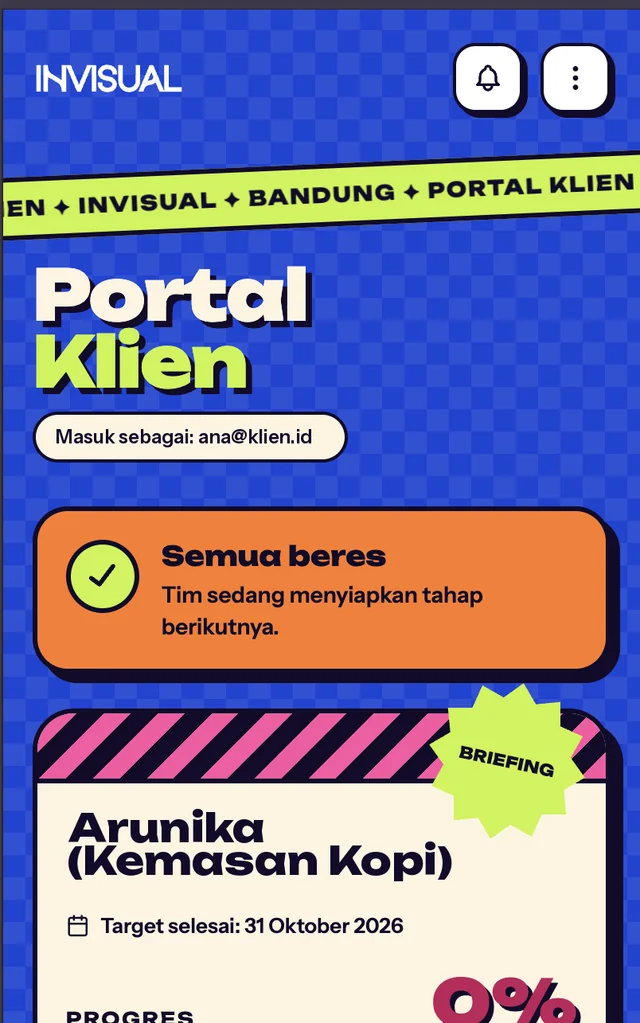
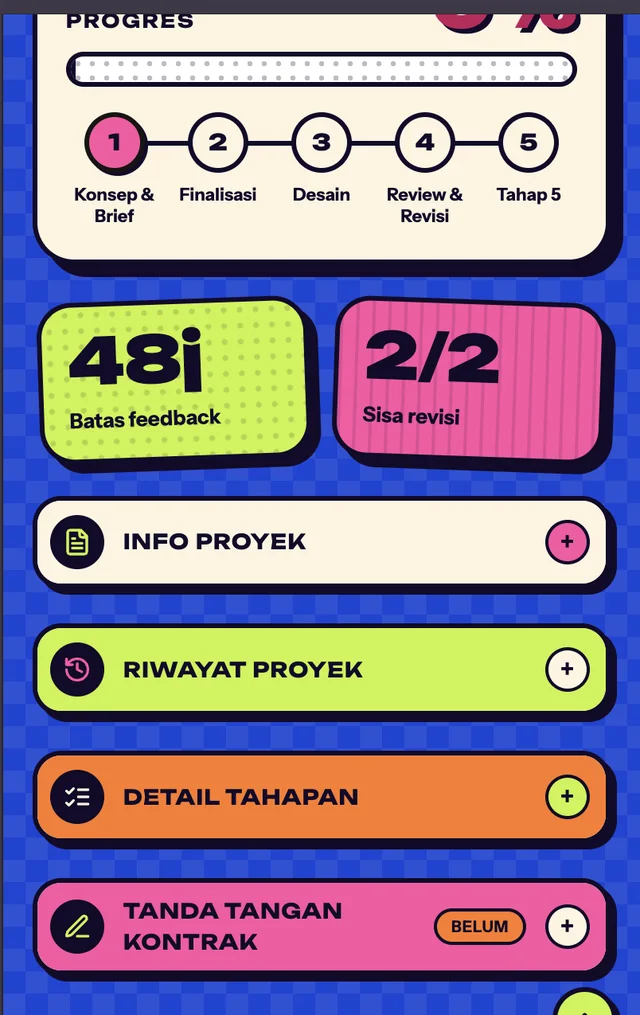
Clients see the project status and the one next step they need to take. There's a countdown for the 48-hour feedback window, the revisions left, a stage timeline, contract signing and a PDF report.
Drafts and revisions
Clients approve a draft or ask for a major or minor revision, pin notes right on the artwork, and compare two versions with a slider. Long revision notes are summarised automatically into six points at most, and final files download as one ZIP.
Invoices and chat
Invoices are paid by QRIS, virtual account or e-wallet, or by uploading proof of transfer, and print as PDFs. Chat with the studio has automatic Indonesian-English translation, so clients and the team can each write in their own language.
The studio's workspace
The studio team moves projects across a Kanban board: briefing and MoU, design, review and revision, then done. The overview shows receivables, monthly revenue, overdue invoices and today's focus, with a button to send the client a reminder.
How a project runs
- The studio opens the project and the client signs the contract in the portal
- The studio uploads a draft and the client is notified in the app, by email and on their phone
- The client approves or asks for revisions within 48 hours
- The studio revises, and both sides can see how many revisions are left
- The client pays the invoice and downloads the final files
Decisions that protect the business
The studio side is for studio emails only
Access to the studio side is checked by the same rule in the app and in the database. An email address that merely imitates the studio's domain is rejected, so outsiders can't reach every client's data.
Approval links can be revoked
People on the client's side without an account, such as a manager who has to sign off, can open the draft through a private link. The link expires after 14 days and the studio can revoke it at any time.
Paid only when the payment gateway confirms
An invoice only turns paid after the payment gateway confirms the payment. Confirmations without the studio's secret code are rejected, so nobody can fake a paid status.
Every bug gets its own test
Every bug ever found gets a named test so it can't come back, and 145 access scenarios are tested directly against the database.
By the numbers
- 145
- access scenarios tested
- 3
- ways to pay online: QRIS, VA, e-wallet
- 14
- days an approval link stays valid
- 4
- stages on the studio's Kanban board
Built with Next.js, React, TypeScript, Supabase (PostgreSQL), Xendit, Resend, PWA.